
If you want to direct your users to their Feedback4e accounts with a link such as "Performance Management" through an HRIS or portal they are logged in to, and you do not have an SSO identity provider that supports SAML, you can use this option.
For Feedback4e settings
More > Administration > Integrations > Login Configuration
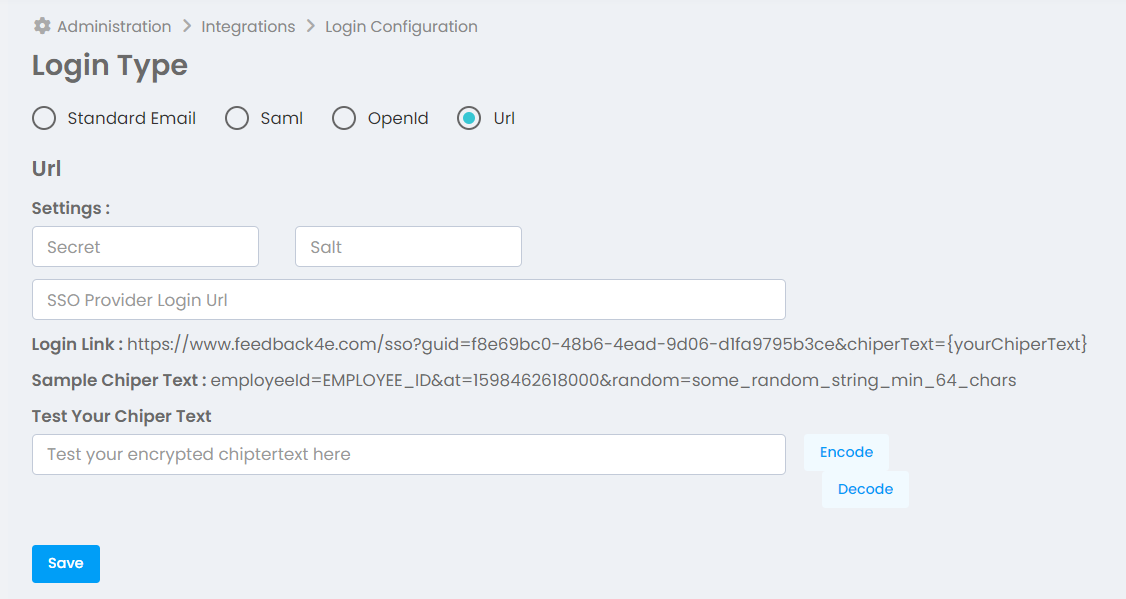
You need to encrypt the chiperText parameter in the session link with secret and salt values on a user-based basis and create them per user. The Chipertext parameter value you will send in the URL {yourChiperText} must be encoded with base64.
The chipertext value must be in url query string format and the value corresponding to employeeId must be added next to it. You only need to define the employeeId parameter value with the employee's unique registration number in the text in the example (Sample ChiperText) in the screenshot above, without changing the other parameters.
The guid parameter in the session link is created specifically for your account. Please use the guid value on your Session Type page in your Feedback4e account.
When identifying employees in Feedback4e, do not forget to add their registration number. If the registration number of the user registered in Feedback4e is not defined, the user will not be able to log in and will be directed to the Feedback4e Login screen.
Encryption should be done with the AES algorithm. You need to enter the Secret and Salt values you will use for encryption from the screen above.
In the SSO Provider Login Url, enter the login link of the portal where users will log in to access the Feedback4e SSO link.
Go to the link below for sample .net code.
https://docs.microsoft.com/en-us/dotnet/api/system.security.cryptography.aes?view=netframework-4.8