
To see objective;
To see group, individual and company objectives for the cycle and navigate between objectives
You need to follow these steps
Objectives
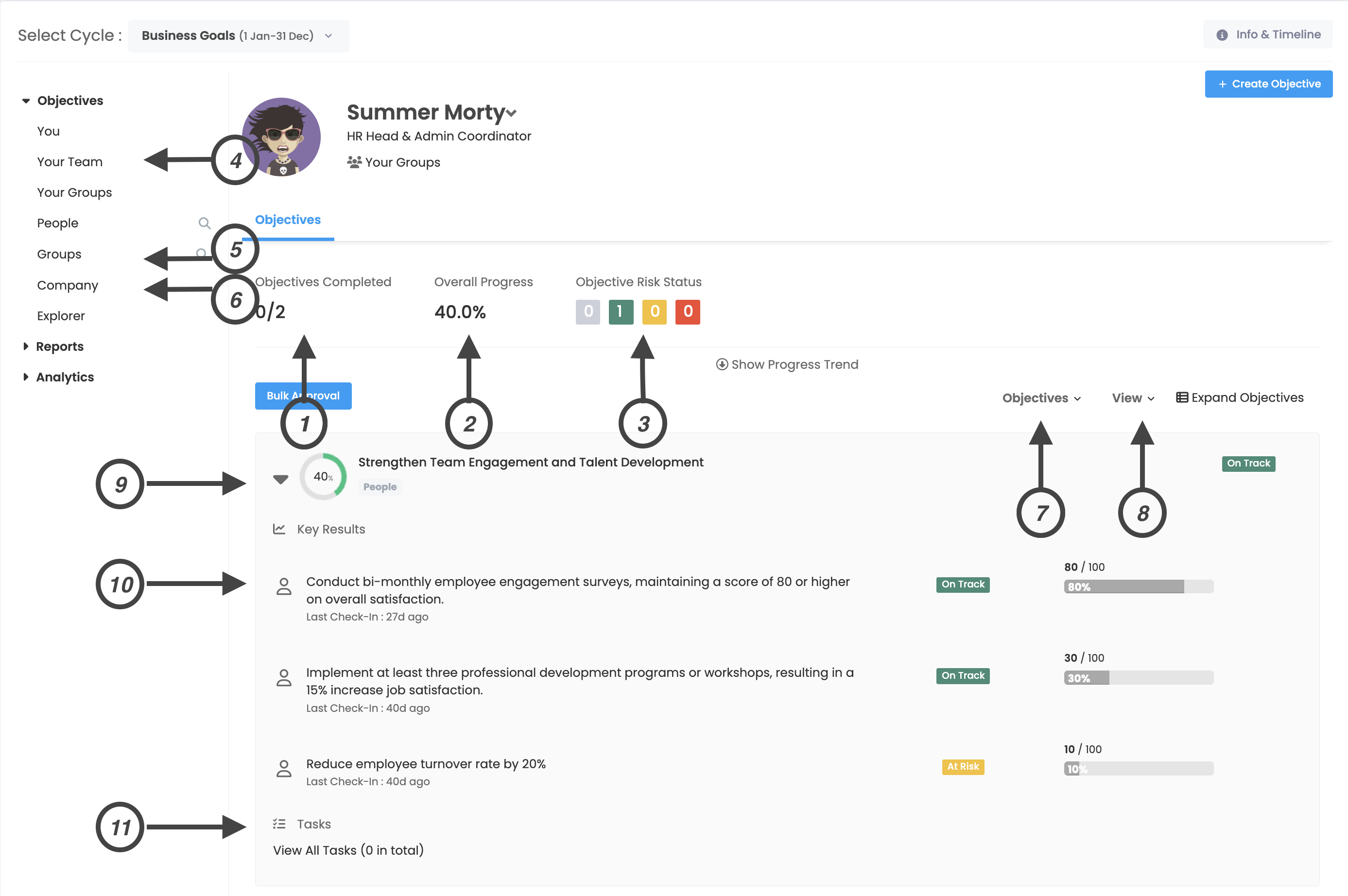
1. Objectives Completed
You can see the total number of objectives and the number of completed objectives.
2. Overall Progress
You can see the percentage progress of your objectives. Overall progress is the average of the progress of all objectives below.
3. Objective Risk Status
Gray: Shows the number of unchecked destinations.
Green: Indicates that objective progress is on track.
Yellow: Indicates that objective progress is risky.
Red: Indicates that objective progress is deviated.
4. Your Team
The section where your team are displayed. From here, you can view your teammates' objective profiles and get an idea about their objectives and progress.
5. Groups
This is the section where groups are displayed. From here, you can navigate between groups and get an idea about group objectives and progress.
6. Company
The section where company objectives are displayed. You can achieve company objectives by clicking this link.
7. Objectives/Tasks/Key Results
In this section, you can view the objectives, tasks and key results assigned to your side or others separately.
8. View > Tree View/List View/Chart view
From this section you can choose how to display the listing.
9. Objectives
You can view your objectives from this section.
10. Key Results
You can view the key results in this section.
11. Tasks
You can view your tasks from this section.